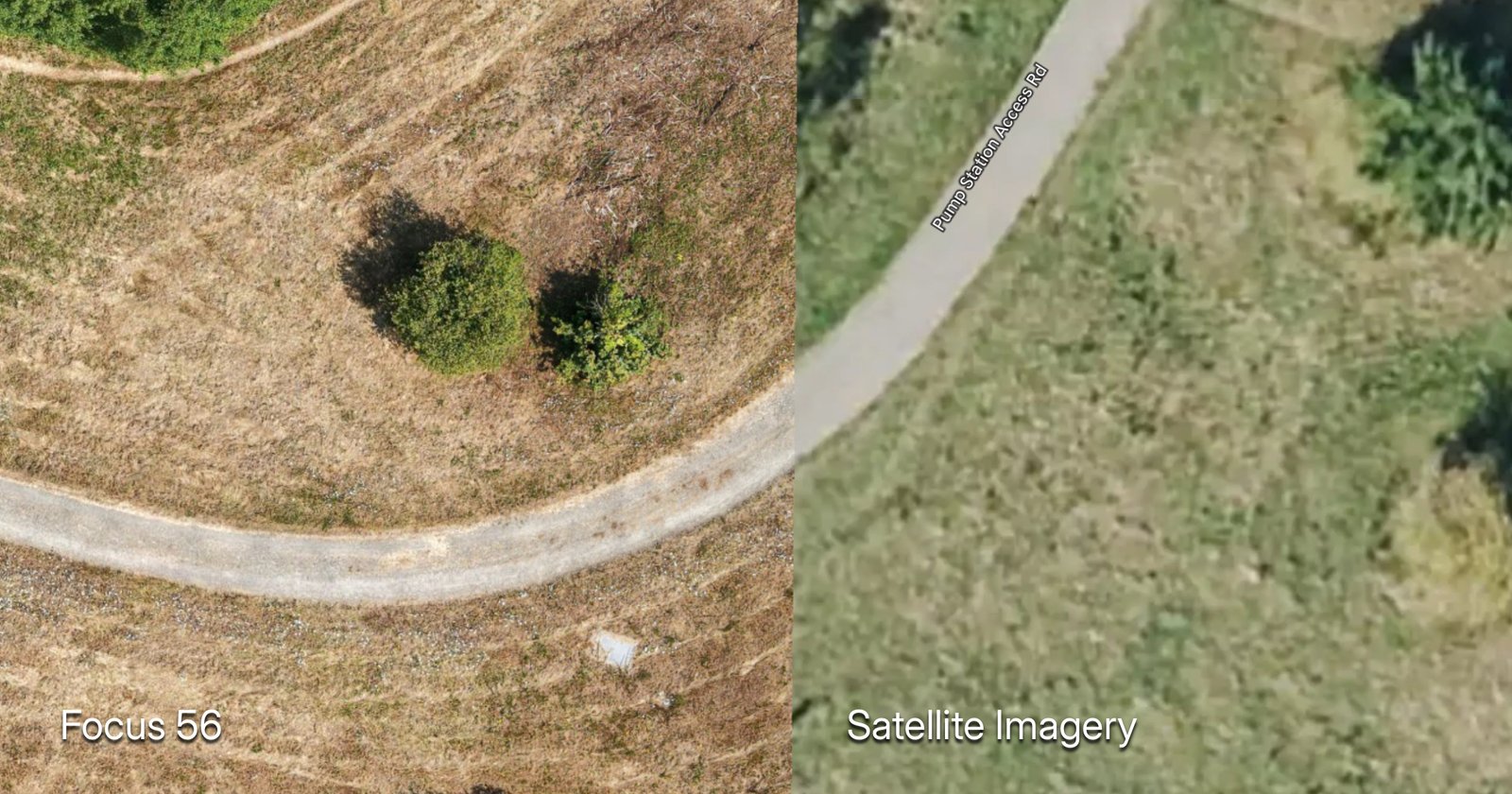
If you’ve ever zoomed in on Google Earth and wished the image was sharper, more recent, and detailed enough to work from — you’re already thinking about orthomosaic mapping.
As a drone pilot working across Thurston County and the South Puget Sound region, I create orthomosaic maps for clients who need a clear, current, measurable view of their land. In this guide, I’ll walk through what orthomosaic maps are, how they work, what they cost, and practical ways to put them to use.
What Is an Orthomosaic Map?
An orthomosaic map is a single, high-resolution image of an area created by stitching together dozens or hundreds of overlapping aerial photographs. Each individual photo is corrected for lens distortion, camera tilt, and perspective so that the final image has a uniform scale throughout — meaning you can measure distances, calculate areas, and trust that what you see represents the area.
Think of it this way: a regular drone photo is like a snapshot. An orthomosaic is like a blueprint made from photographs.
The word “orthomosaic” combines two ideas:
- Ortho — meaning “corrected” or “true.” Each photo is orthorectified, removing the distortions that come from camera angle and terrain.
- Mosaic — meaning many pieces combined into one. The corrected photos are stitched together into a seamless image.
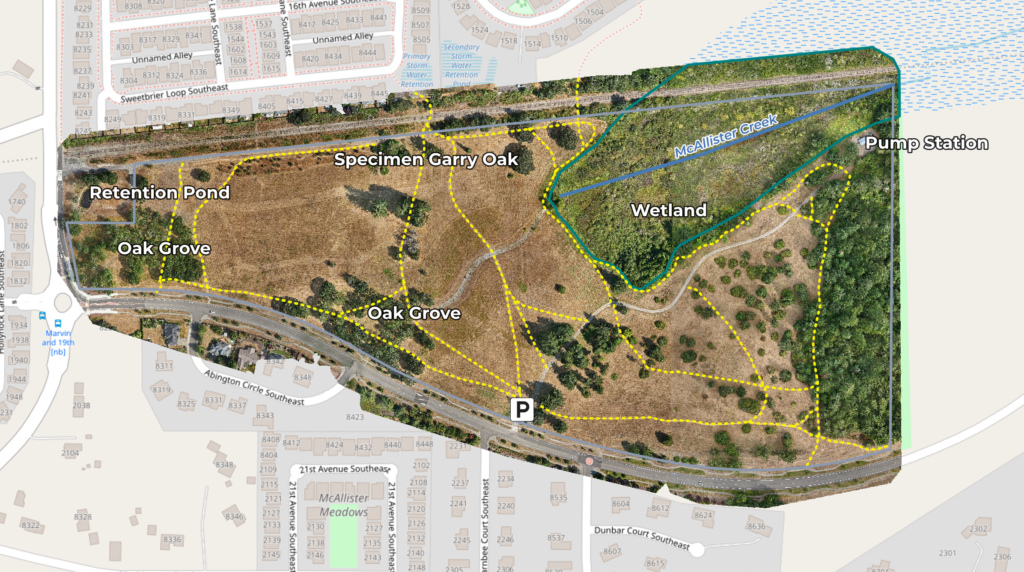
The result is a map-quality image where every pixel corresponds to a real-world coordinate. You can open it in GIS software, measure a property line, calculate the square footage of a clearing, or track how a construction site has changed over time.
How Is an Orthomosaic Different from a Regular Aerial Photo or Satellite Imagery?
Not all overhead imagery is created equal. The differences matter — especially if you need to measure, plan, or make decisions from what you’re looking at.
Regular aerial photo: A single image taken from above. Objects near the edges are distorted. Buildings lean. Scale isn’t consistent — distances measured at the center of the photo are different from distances at the edges. It looks nice, but you can’t reliably measure from it.
Satellite imagery (Google Earth): Covers huge areas but is often months or years old. Resolution is limited — typically 15-30 cm per pixel for free imagery. You can’t get a fresh capture of your property on demand, and cloud cover frequently obscures the ground.
Orthomosaic map: High-resolution (1-3 cm per pixel with a drone), geometrically corrected, and georeferenced. Every pixel has a known coordinate. Scale is uniform across the entire image. You can measure from it with confidence.
| Feature | Regular Drone Photo | Satellite Imagery | Orthomosaic Map |
|---|---|---|---|
| Resolution | 1-5 cm/px | 15-30 cm/px | 1-3 cm/px |
| Currency | On-demand | Months/years old | On-demand |
| Accuracy | Poor (distorted) | Moderate | Good (corrected) |
| Measurable | No | Roughly | Yes |
| GIS-compatible | No | Sometimes | Yes |
| Coverage | Small area | Huge area | Medium-large area |
The key advantage is control. With a drone, you decide when to fly, what resolution to capture, and what area to cover.
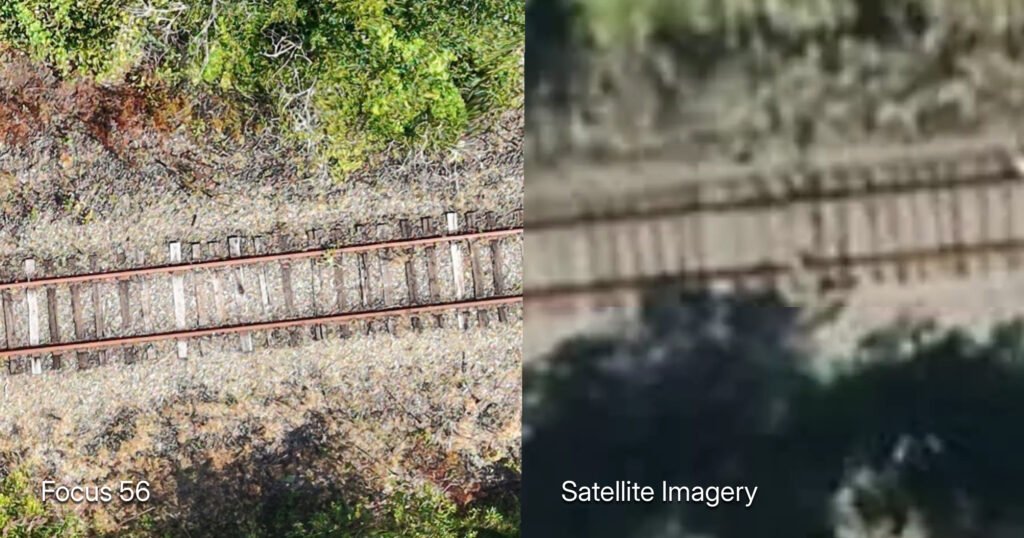
Left: drone orthomosaic at 2 cm/px. Right: map satellite imagery of the same area.
How Orthomosaic Maps are Created with Drones
This is the workflow that I use to create maps with my drone.
1. Flight Planning
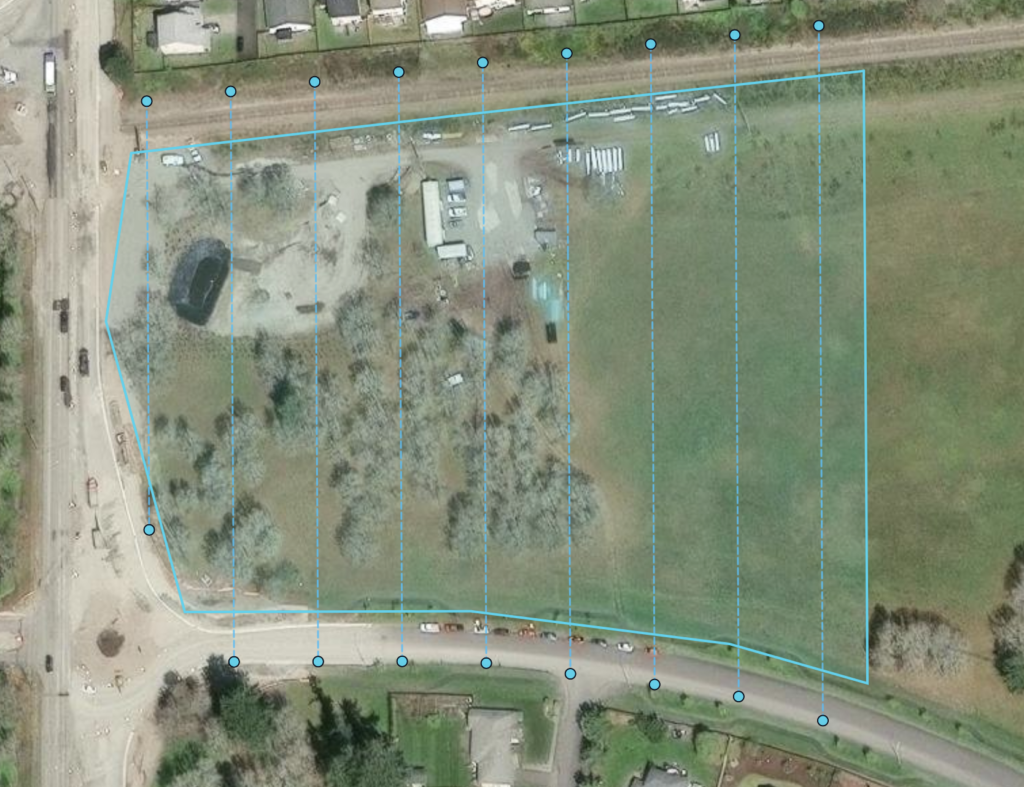
Before takeoff, I define the map area in flight planning software — I’m currently using Waypoint OS. Other capable options include DroneDeploy, Pix4D, and Litchi — each with different pricing and features. The software calculates a grid pattern that covers the entire area with the right altitude, speed, and camera settings to achieve consistent resolution.
The critical settings are:
- Altitude: Lower means higher resolution but smaller coverage per flight. I typically fly 200-400 feet above ground level. (Ground Sampling Distance – GSD)
- Forward overlap: How much each photo overlaps the one before it. I aim for 75-80%.
- Side overlap: How much each flight line overlaps the adjacent one. I target 65-70%.
That overlap is what makes the magic happen. The software needs multiple views of every point on the ground to reconstruct the 3D geometry and correct for distortion.
2. Image Capture
The drone flies the grid automatically, triggering the camera at calculated intervals. A typical 10-20 acre site generates 200-500 photographs. Each image is geotagged with GPS coordinates from the drone.
3. Processing and Stitching
After the flight, the images go into photogrammetry software such as DroneDeploy or WebODM (Open Drone Map). Here’s what happens behind the scenes:
- The software identifies matching features across overlapping photos (a rooftop corner, a tree, a fence post)
- It calculates the 3D position of each feature and refines camera positions
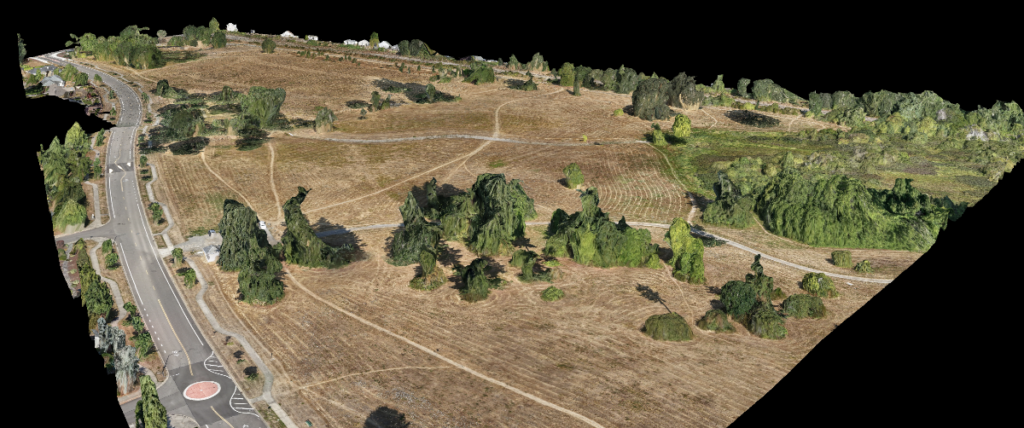
- It builds a dense point cloud — a 3D model of the terrain
- Each pixel is projected onto the corrected surface, removing distortion
- The corrected images are blended into a single seamless map
4. Analysis and Deliverables
Once the orthomosaic is generated, it can be brought into a GIS application for analysis. This is where the map becomes useful for clients. A GIS application can:
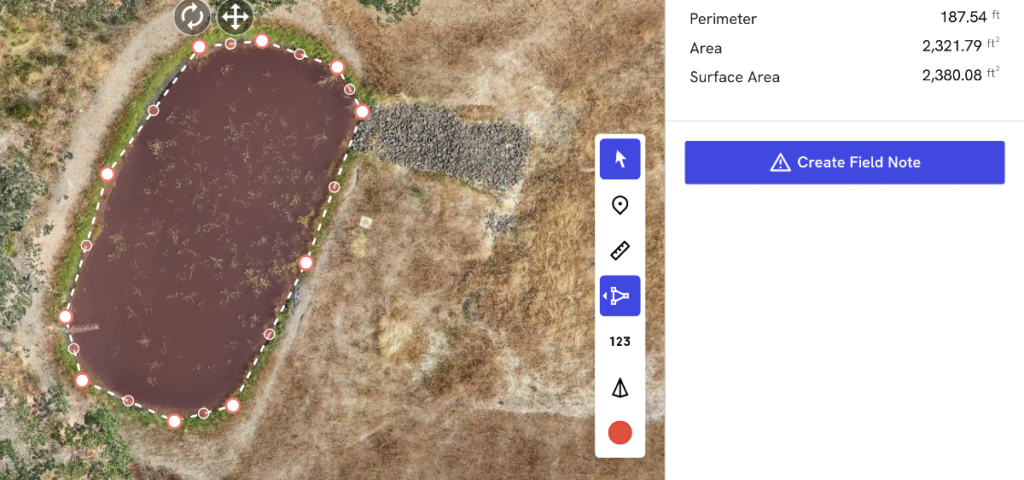
- Measure distances and areas with precision
- Create annotated overlays showing property features
- Export the map in various formats (GeoTIFF, KMZ for Google Earth, and others)
- Calculate square footage of clearings, building footprints, or coverage areas
Accuracy: What to Expect from Consumer Drone Mapping
Precision vs. Accuracy
Precision and accuracy are often used interchangeably, but they measure different things — and it’s important to understand the difference when you’re choosing a drone mapping service. Accuracy is how close a measurement is to the true value — does the map put a fence corner where the fence corner actually is in the real world? Precision is how consistent repeated measurements are — if you flew the same site three times, would all three maps place that fence corner in the same spot every time?
You can have high precision (consistent results every time) without high accuracy (consistently wrong by the same amount). A consumer drone like the DJI Air 3S delivers excellent precision — repeatable, reliable maps flight after flight — but only moderate absolute accuracy of 1-3 meters without RTK (Real-Time Kinematic) correction or ground control points. Enterprise drones equipped with RTK GPS push both precision and accuracy into the centimeter range, but they cost significantly more and require a licensed land surveyor for legally binding work.
Orthomosaic accuracy comes in several flavors. Here’s the breakdown:
Absolute Accuracy (Horizontal)
How close a point on the map is to its real-world GPS position. Measured against known control points (survey markers). Without RTK/PPK on the drone, you’re typically looking at 1-3 meters with consumer grade drones. With RTK (Mavic 3 Enterprise), you can get down to centimeter-level.
Relative Accuracy
How accurate the distances between points on the map are — even if the whole map is shifted. Two trees measured 50 feet apart on the map should be 50 feet apart in reality. Relative accuracy is always better than absolute accuracy. This is what matters most for construction monitoring, stockpile volume calculations, and progress tracking — you care about measurements within the map, not where the map sits on the globe.
Vertical Accuracy (DEM/DSM)
How accurate elevation data is. Generally 2-3x worse than horizontal accuracy. The Air 3S without RTK will give you rough elevation data — fine for visual terrain models, not survey-grade. Enough for stockpile volume estimates within ~5-10% margin.
What This Means for Your Project
The drone you choose determines the accuracy you can achieve — and accuracy drives cost.
Consumer-grade drones with a high-quality camera but standard GPS (no RTK correction) can be used to produce high-resolution maps. Maps produced with these drones have many uses and cost less to produce.
I fly a DJI Air 3S. It’s a consumer-grade drone with a high-quality camera but standard GPS — no RTK correction. Here’s what that means in practice:
- Horizontal accuracy: Approximately 1-3 meters without ground control points
- With ground control points (GCPs): Sub-meter accuracy is achievable with properly placed targets at known coordinates.
- Relative accuracy (measuring between two points on the same map): Typically better than absolute positioning — often 10-30 cm
The maps I create with the Air 3S are highly useful for a wide range of applications — construction progress monitoring, visual site documentation, stockpile volume estimates, tree and vegetation assessments, and real estate marketing. Distances and areas measured within the map (relative accuracy) are typically accurate to 10-30 centimeters, which is more than sufficient for measuring a building footprint, calculating stockpile volumes, or tracking earthwork progress over time.
What these maps won’t do is replace a legal property boundary survey or engineering-grade topographic survey. If your project requires centimeter-level absolute positioning against known survey benchmarks, you need an RTK-equipped enterprise drone operated by a licensed surveyor — and that comes with a correspondingly higher price tag. For everything else, consumer-grade drone maps deliver professional-quality results at a fraction of the cost.
The DJI Air 3S also has a rolling shutter, which means the camera sensor reads line by line rather than capturing the whole frame at once. This can introduce slight distortion in fast motion, but modern photogrammetry software — including WebODM — handles rolling shutter correction well. The key is flying at a steady speed with minimal wind. In Waypoint OS mapping missions, flight speed is automatically managed to minimize motion distortion, so rolling shutter effects are kept to a minimum.
Practical Uses for Orthomosaic Maps
Orthomosaic mapping isn’t just for large construction firms. Here are the clients I work with most often in the South Puget Sound region:
Construction Monitoring
Builders and developers use orthomosaic maps to track progress, document site conditions, and communicate with stakeholders. A weekly or monthly orthomosaic gives everyone — from the project manager to the investor — a clear, current view of what’s happening on site.
For sites that need tighter accuracy, ground control points (GCPs) can be placed before the flight — simple printed targets with known coordinates that anchor the map to precise real-world positions. This pushes absolute accuracy from meters to sub-meter without requiring enterprise drone hardware.
Real Estate (Especially Raw Land)
Real estate agents listing raw land or large parcels face a challenge: how do you show a buyer the full property in a meaningful way? An orthomosaic map provides a current, high-resolution view that property listings and satellite imagery can’t match. Buyers can see access roads, clearing boundaries, water features, and topography in a single image.
Orthomosaic maps are useful for property marketing, site assessments, planning developments, and property management.
Land Development and Planning
Before breaking ground on a new development, an orthomosaic provides an accurate base map for planning. Engineers and architects can use it as a reference layer, and developers can track how the site evolves from raw land to finished project.
Agriculture and Farming
Farmers use orthomosaic maps to monitor crop health, assess drainage patterns, and track field conditions over time. With multispectral sensors, you can generate NDVI maps that highlight stressed vegetation — but even standard RGB orthomosaics are valuable for field documentation and planning.
Golf Courses and Event Venues
Large properties like golf courses, event venues, and parks benefit from orthomosaic maps for maintenance planning, layout documentation, and marketing. A current orthomosaic is also valuable for insurance documentation and facility management.
Environmental and Conservation Work
Orthomosaics help track shoreline erosion, monitor wetland boundaries, and document habitat changes over time. In the South Puget Sound area, where shoreline and wetland management is an ongoing concern, having current aerial imagery is invaluable.
What Deliverables Look Like
When I complete a mapping project, clients receive several deliverables:
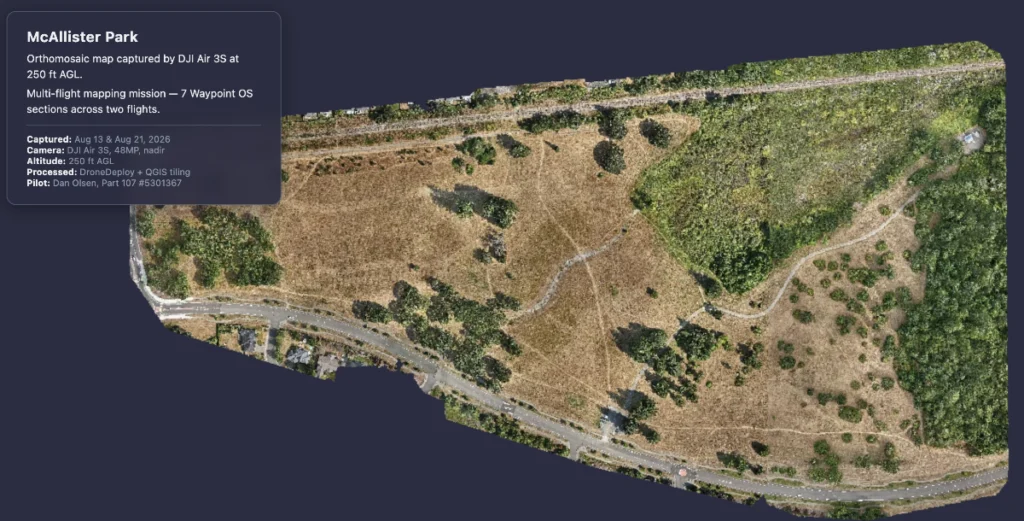
- Georeferenced orthomosaic (GeoTIFF): The full-resolution map with embedded coordinate data. Opens in any GIS application.
- Google Earth file (KMZ): A compressed version that anyone can open in Google Earth for quick viewing.
- Measurement report: Area calculations, distance measurements, and annotated features based on client needs.
- 3D point cloud: A 3D point cloud is a dense set of data points representing the terrain’s surface — useful for terrain analysis, volume calculations, and visualization.
- Ground control point placement is available as an add-on for projects requiring tighter accuracy. Targets are placed at known coordinates before the flight, and the processing software uses them as anchor points to improve absolute positioning.
The format depends on what the client needs. A real estate agent might just want the KMZ for a listing. A construction company might want the GeoTIFF for overlaying with CAD drawings. A landowner might want printed measurements of their clearing.
Drone Mapping vs. Professional Surveying: What’s the Difference?
This is an important distinction. Orthomosaic drone mapping is a powerful tool, but it is not a replacement for a licensed land surveyor.
When Drone Mapping Is Sufficient
- Visual reference and documentation
- Progress tracking over time
- Approximate area and distance measurements
- Site planning and conceptual design
- Marketing and presentation materials
- Identifying features and conditions on a property
When You Need a Licensed Surveyor
- Property boundary determination
- Legal descriptions for deeds or title transfers
- Construction staking and layout
- Elevation certificates for flood zones
- Any application requiring legally defensible measurements
In Washington State, only a licensed land surveyor can legally establish property boundaries. Drone mapping complements surveying — it doesn’t replace it. Think of orthomosaic mapping as a fast, affordable way to get a current, detailed visual reference. When you need legal-grade accuracy, hire a surveyor.
The Cost Advantage
Traditional aerial surveying with manned aircraft can cost $5,000-$15,000+ per project. Drone mapping brings that cost down significantly while delivering comparable or better resolution for most applications.
Pricing for drone mapping services depends on:
- Site size: Larger areas require more flight time and processing
- Deliverables: A simple orthomosaic costs less than a full package with measurements and 3D models
- Location: Travel time and site accessibility factor in
- Frequency: One-time captures cost more per project than recurring monitoring contracts
For most small-to-medium projects in the Thurston County area, drone mapping costs a fraction of traditional surveying while delivering results faster — often same-day or next-day turnaround.
Local Applications: Thurston County and South Puget Sound
Living and working in Lacey, WA, I understand the specific needs of property owners and developers in our region:
- Rural property mapping: Large parcels in Thurston, Lewis, and Mason Counties where current satellite imagery is outdated or low-resolution
- Shoreline documentation: Properties along Puget Sound, Henderson Inlet, and local lakes where erosion and tidal changes affect boundaries
- New construction documentation: Tracking build progress for homes and commercial projects across Lacey, Olympia, Tumwater, and Yelm
- Land clearing verification: Documenting timber harvest and clearing activities for permitting and compliance
- Agricultural mapping: Farm fields and pastureland in the South Sound region
The Pacific Northwest weather does require some planning — I watch for windows of clear conditions and calm winds, which are common in our summer and early fall months. But the technology works year-round when conditions allow.
Frequently Asked Questions
What is an orthomosaic map in simple terms?
An orthomosaic map is a single, high-resolution image created by stitching together many overlapping drone photos. Each photo is corrected for distortion so the final image has uniform scale — meaning you can measure distances and areas from it accurately.
How accurate are orthomosaic maps made with consumer drones?
With a consumer drone like the DJI Air 3S (no RTK), expect 1-3 meters of horizontal accuracy without ground control points. With ground control points, sub-meter accuracy is achievable. For centimeter-level accuracy, you need RTK-equipped drones and ground control — typically a licensed surveyor’s domain.
How long does it take to create an orthomosaic map?
Flight time depends on the area size — a 10-acre site takes roughly 15-20 minutes of flight time. Processing can take anywhere from 30 minutes to several hours depending on the number of images and processing power. Total turnaround is typically same-day or next-day.
Can I use an orthomosaic map instead of a land survey?
No. Orthomosaic maps are excellent for visual reference, planning, and approximate measurements, but they cannot replace a licensed land surveyor for legal boundary determination, construction staking, or any application requiring legally defensible measurements.
What software is used to create orthomosaic maps?
I use Waypoint OS for flight planning, WebODM (Open Drone Map) for photogrammetry processing, and QGIS for analysis and measurement. Other popular options include DroneDeploy, Pix4D, and Agisoft Metashape — though these commercial options require subscription fees.
Ready to Map Your Property?
Whether you’re tracking a construction project, listing raw land, or need a current aerial view of your property, Focus 56 delivers professional orthomosaic mapping services across Lacey, Olympia, Tumwater, and the greater Thurston County area.
Every project is flown by an FAA Part 107-licensed pilot using professional-grade equipment and open-source GIS tools. You get current, measurable, georeferenced imagery — delivered in the format that works for you.
Visit focus-56.com to request a free quote and talk through your project.

Leave a Reply